Printables.com
Ender 3 S1 Pro - Gulf Coast Robotics 3 Point Y Carriage Handle
🏭 100+ tiskáren
·
po celé ČR
·
⏱ platba po přijetí tiskárnou
Autor modelu: cjourdan87
·
originál na Printables.com
Popis
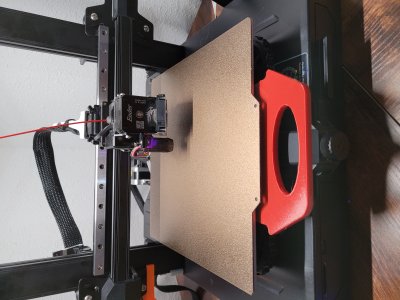
I recently switched my Ender 3 S1 Pro over the Gulf Coast Robotics 3-point Y Carriage and after installing, realized I had no handle for the bed. I wasn't a fan of either handle Gulf Coast offered. I liked the original handle from the Creality bed, so I modeled this off of that to fit the Gulf Coast carriage. It took a few tries so it would fit in between my bed and carriage after leveling, but I like the final result. This handle mounts to the carriage unlike the Creality handle that is attached to the heated bed.
I have uploaded four different versions, with "V3" being the final, more complete version. You may find uses for any of them.
The test handle is just that, just the handle. You can use it for whatever.
• V1 - Made just taking measurements off the original Creality handle and the hole layouts from GulfCoast. It didn't stick out from the bed as far as I wanted, and the middle body was a bit thick. I had concerns about it possibly hitting the Y axis belt tensioner.
• V2 - Same body thickness as V1 but extended the mounting tabs to move handle out from the bed further.
• V3 - Thinner body with extended mounting tabs, as well as counterbored holes to accept M4 socket head cap screws.
Note: ONLY V3 has the counterbored holes.
Settings used:
• 15% Cubic Infill
• 0.2mm layer height
• Supports
• Brim
• 245/75 first layer, 245/70 thereafter
Materials used:
• (2)M4 SHCS Bolts
• PETG from IIID Max
Podobné modely
od 910 Kč