
Printables.com
Soft Tape Measure Spool Remix - Parametric
🏭 100+ tiskáren
·
across Czechia
·
⏱ pay after printer accepts
Model author: codysechelski
·
original on Printables.com
Description
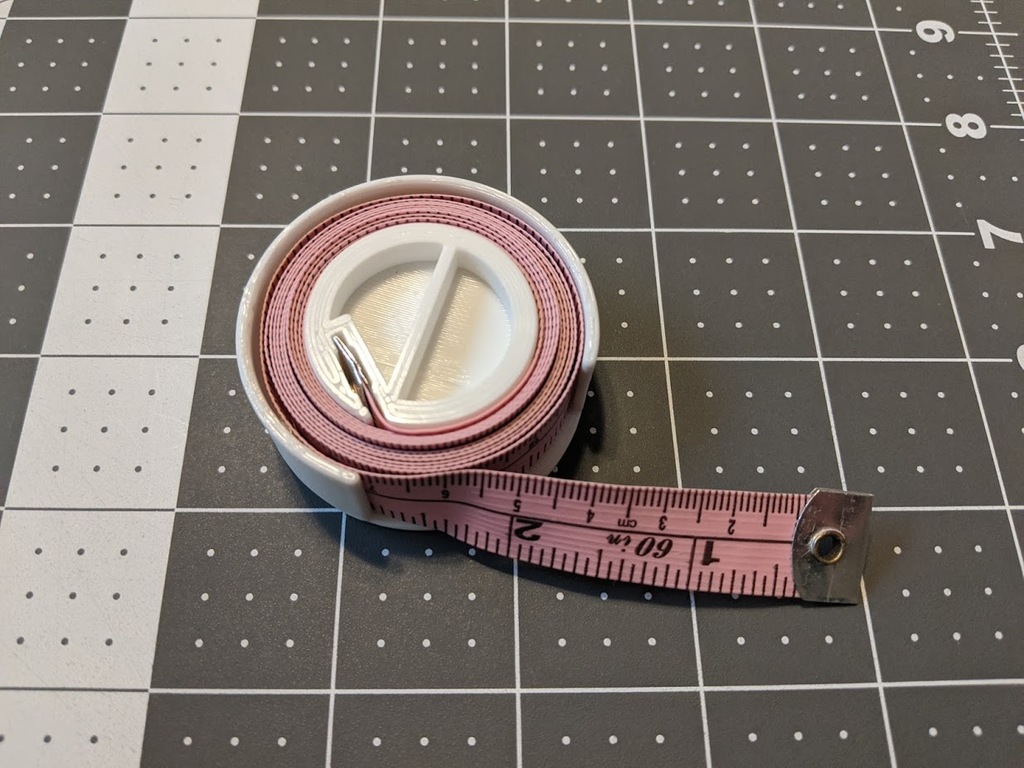
👇 See sizing instructions below 👇 Original Tingivese DescriptionThis is a remix on ohmg's tape measure holder. Thank you for providing the STEP file!My wife's tape measure had a rivet holding on the metal end, so I had to make a notch in it for that. I was also having a hard time with the finger hole because it was providing asymmetrical pressure on the outer piece. This increased the friction and made it hard to spin. At lease that was the case for me. Your mileage may vary.So I just removed the finger hole and added a cross handle so that it winds up like those old metal wind-up toys UpdatesMarch 23, 2023Included Parametric Fusion 360 FileIncluded new sizesheights from 16-20mm in 1mm stepsdiameters from 45-55mm in 1mm stepsApril 13, 2023Added the 16X45mm base, which was missing for some reasonOrganized all of the STLs into folders by height and ordered the files within each folder by diameterAdded note about going below 16mm on the heightMay 23, 2023Added a 20x60 base per special request.Please leave a comment if there is a special size you need and I will try to get to it when I can. Thanks! How to choose the right sizeWhen it comes to getting the right size, you have 2 options. You can use the pre-sized stl files, or to really dial in the size you can open up the f3d file in Fusion 360 and change the parameters to the exact measurements of your tape measure. Either way, follow the procedure below for a great fit:Step 1 - Measure the width of your tapeStep 2 - Print the winder partIf you are using the STL files, select the winder (inner) part that is as tall, or slightly taller than your tape measure is wide.If you are using the Fusion 360 file, open the parameters panel and set the tape_height to your measurement.NOTE: Going below 16mm will start to affect the geometry of the winder. It may still function but it will be missing some faces.Print the winder partStep 3 - Wind your tape and measure the diameterOnce the winder part is printed, wind your tape on it to get an accurate measurement of the overall diameter.Step 4 - Print the baseIf you are using the STL files, select the base that has the same height as the winder you printed and a diameter that is equal to or slightly larger than your measurement.If you are using the Fusion 360 file, set the inside_diameter parameter to your measurement Print the base partStep 4 - Assemblecarefully snap the parts togetherwind your tapeenjoy 😀
Similar models


from 160 Kč

![[BaBo] insert glue 2x5](/assets/img/placeholder-model.webp)

from 370 Kč