Unknown source
Raspberry Pi NAS Enclosure - Dual SSD 2.5"
🏭 100+ tiskáren
·
across Czechia
·
⏱ quotes in 24 h
Description
Hey everyone!
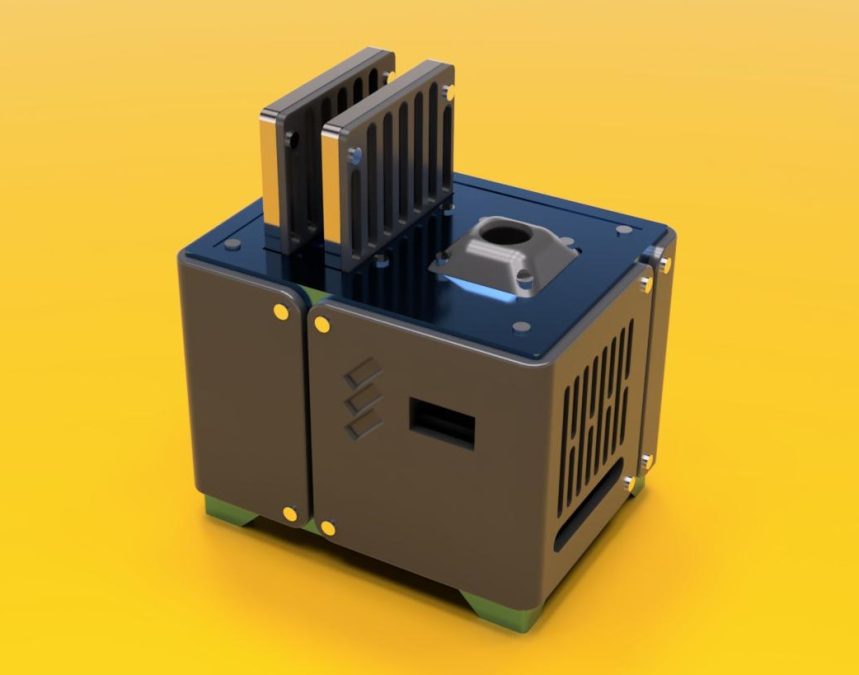
I just started getting into electronics and design after a bit of 3D printing. This is my first official project with proper documentation, measurements, and testing around a Raspberry Pi. The design is purposeful where the SSDs stick out and with cables going around, wrapped in a cable sleeve for an interesting look. The OLED helps to monitor the device and to check ip.
Updates:
• 9/22/2023: Initial release
Parts used:
• 1x Raspberry Pi 4B 2gb
• 1x OLED 0.96 i2c display module
• Required cables (ethernet, power cable, etc.)
• 1x 60mm 5v USB fan
• 2x USB to SATA cable
• 2x SSD 2.5"
• 2x M3 14mm-16mm screw
• 23x M3 6mm screw
• 25x M3 4mm screw
• 2x M3 nut
https://www.amazon.com/Sabrent-2-5-Inch-Adapter-Optimized-EC-SSHD/dp/B011M8YACM/ref=sr_1_4?crid=XHDE9KMMJRLB&keywords=sata%2Bto%2Busb%2Bconnector&qid=1695431511&s=industrial&sprefix=sata%2Bto%2Busb%2Bconenctor%2Cindustrial%2C86&sr=1-4&th=1
All up to you but this is how I printed mine:
• Printer: Bambu Lab P1P & Elegoo Neptune 3 Plus - for the inner panels
• Some adjustments have to be made in terms of the base
• Walls: 4
• Top/bottom: 4
• Nozzle: 4mm
• Layer height: 0.16mm
• Infill: 15-20% - any pattern
• Supports: ON for outer panels - tree
• Brim: ON for outer panels
Here are some assemblies to help install and notes:
• SSD side bracket is to be mounted inside, keeping the 2 SSDs in place
• 60mm USB fan apparently can't be controlled so I'd recommend an adapter with a physical knob attached
• There are 3 versions of Front Panel Outer for OLED, no OLED, and additional airflow.
• SSD top panel bracket only needs 2 screws for SSD on the top as it's stable enough
Please leave any comments/feedback as they would be greatly appreciated!
Similar models

from 910 Kč