Unknown source
Moopsy: The Cuddly Bone-Vampire from Star Trek
🏭 100+ tiskáren
·
across Czechia
·
⏱ quotes in 24 h
Description
Change log:
• 9/12/23: Added photos of my make, and uploaded a STEP version.
• 9/13/23 (midnight): Added a multi-part version and instructions. Requires glue, but you only need a black sharpie/paint and single-color printing instead of fancy multi-color printing.
• 9/13/23 (actual morning): Drastically improved and simplified instructions and model so that one multi-part model should serve everyone's needs. Updated STEP file too. This also will improve multi-color printing ease and final product significantly due to slicer glitches with the earlier model.
• 9/19/23: Smaller head version now available here for people who prefer this look.
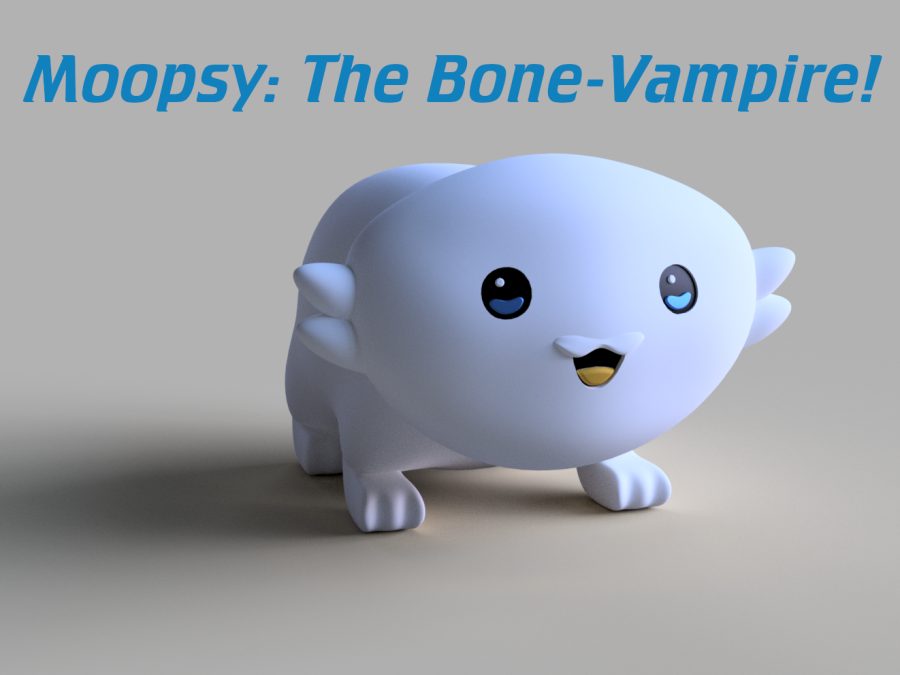
Moopsy was first seen in the episode “I Have No Bones Yet I Must Flee” of Star Trek: Lower Decks, where it caused havoc in a galactic menagerie. Moopsy is one of the most terrifying aliens ever introduced in Star Trek, despite its cute appearance.
I could not help myself by try to replicate this creature. I'm a total novice at Fusion360, but I tried my best to produce a faithful looking replica… with way too much effort. I actually think it looks pretty decent. Requires some supports, as shown.
Printed here in 4-color PLA on my X1C to match the picture shown above from the show. You could probably just print it all one color though and paint it.
Flavor text I made for this critter:
Moopsy is a small, furry alien with big eyes and a round body. It looks harmless and adorable, but it has a hidden ability to launch itself at high speed towards its prey and sink its sharp teeth into them. Moopsy drains the bones of its victim, leaving behind a boneless sack of flesh. Moopsy is very hungry and will chase after any food source relentlessly.
How To Print Multi-color (MMU/AMS):
• Supports are needed. Sit him on the designed-in flat butt area, as shown.
• I designed it to minimize the amount of support needed. I used snug supports and PETG as an interface layer, but organic supports should work well here.
• 0.2 mm layer height. At the top I used variable layer height to go down to 0.12 gradually to get a better top finish, but you can do as you like.
• The color objects have been broken out. Here's my recommended coloring:
•
• If you can do 5 filaments at once, you can do some neat stuff. Here's my setup with in 4x PLA colors + PETG as PLA support interface with snug supports.
•
How To Print Multi-color (one color at a time):
• This version makes it easy even if you're bad at using a sharpie/paintbrush to get a good looking result… but you have to print little bits of colored plastic and glue them in place.
• All the parts you need are in the same 3MF file. I suggest printing it so that the eye and mouth parts are part of the main body because the eye and mouth parts would be a little hard to get the fit in perfectly.. but you can try if you like!
• To accomplish this, delete the little eye bits and tounge from the model so you get a setup that looks like this.
•
• Print the setup above.
• Instructions above around orientation, supports and layer heights apply.
• Color in the empty eyes and mouth with a black sharpie or black paint. The result should look like this, more or less:
•
• Now, using the thinnest layer height you can afford print 1x each of these tiny eye/mouth parts individually. They won't fit 100% perfectly to the curvature of the face, but they'll be really close… and if you want you could always warm them up a little with hot water and press them onto the face to get a good fit before gluing.
• Tounge (suggest in yellow)
• LeftEyeHighlight (suggest in white)
• RightEyeHighlight (suggest in white)
• LeftEyeColor (suggest in blue)
• RightEyeColor (suggest in blue)
• These tiny little parts look like this:
•
• Once printed, glue these in place as shown on top of the black-eyed base to end up with the composite product.
How To Print (Single Color):
• This version is ideal for people who are good with a paintbrush and can color in little details with precision.
• Instructions above around supports and layer heights apply.
• Print the combined 3mf file in one color.
• Paint or use sharpies if desired to add color.
Similar models
from 230 Kč