
Printables.com
Minimalist City Map Lithophane Lamps
🏭 100+ tiskáren
·
po celé ČR
·
⏱ platba po přijetí tiskárnou
Autor modelu: FritzPeppone
·
originál na Printables.com
Popis
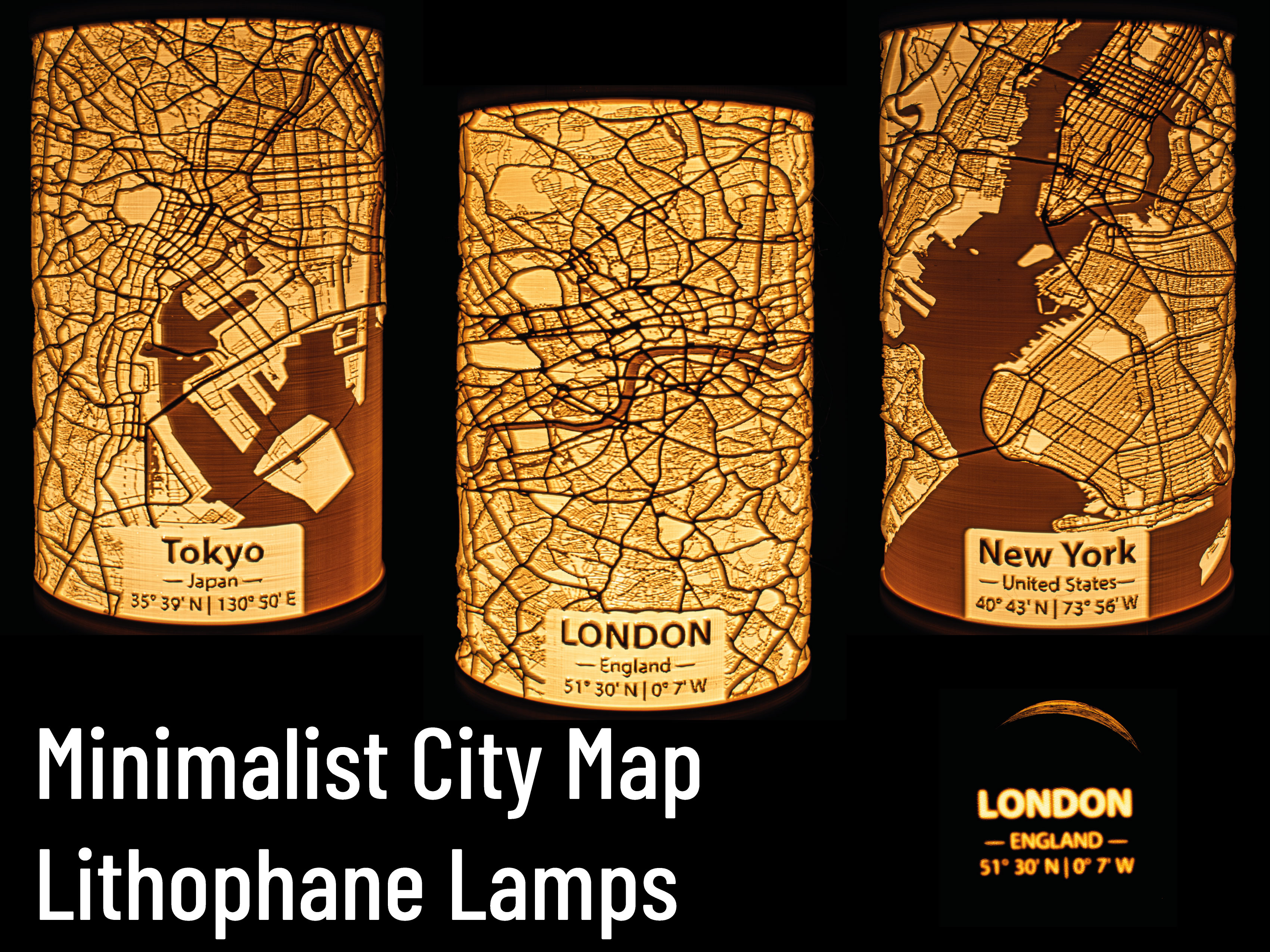
Your city as a LithophaneWhile I continuously add new major cities to this collection, I may not have done your city yet. You can comment your city below and if I have enough free time, I may or may not create a Lithophane model for it. You may also create your own Lithophane! I uploaded a tutorial, detailing my workflow in creating these lamps. You can find it here: https://www.printables.com/model/1213781-minimalist-city-map-lithophane-lamps-tutorial It is published with a Public Domain license. So you can upload your own creation under your own terms and even use it commercially!If you don't want to create an entirely new model, but only want to add minor changes or a personal touch to an already existing upload here (different label, inverse map, …) feel free to ask for high resolution map renderings. I'll gladly share them!Your lamps may also have been created by the community. Check the remixes of this model and the list below! IntroductionFollowing the popularity and success of my Solar System Lithophane Planet Lamp Collection - 205mm³ and Solar System Lithophane Planet Lamp Collection - 75mm³ models, I decided to create further Lithophane lamps. This time, I am focussing on maps. The Minimalist City Map Lithophane Lamps represent urban geography using OpenStreetMap data. Rendered and processed to highlight street networks and spatial structures, they provide a tangible 3D representation of urban features. The lithophane technique encodes geographic data into a relief, making geograpical features, city layouts and infrastructure patterns accessible for education and analysis.All models (except for Fantasy Maps) included in this upload were created using OpenStreetMap data. The minimalist map renderings are original works, created with QGIS. The lithophane generation itself was done with lithophanemaker. The original creators of the Fantasy Maps I used are mentioned in the Acknowledgements.If you like my work, please consider supporting me. Your support will help me to make more models available for free. https://ko-fi.com/fritzpeppone. If you like to use my models commercially, pease join my Printables club to obtain a commercial license. RequirementsAll lamps have a size of ~ 105mm x 105mm x 174mm, making them printable on almost all printers, even the Prusa Mini or Bambu A1 Mini printers. Each lamp requires ~130g of filament (preferably PLA or PLA+) and around 12h of print time.You have to print a city lamp shade of your choice, a lamp base and a lid to cover the top part of the lamp shade. These three parts are connected with a M100x2 metric thread. For now, the only illumination option is the Maker's Supply LED Lamp Kit 001. I plan on adding E14 and E27 options in the future. Print SettingsThere are only a few settings you should tweak in the slicer to print the lamps. Print in PLA or PLA+Recommended layer height: 0.15mmUse the Arachne Perimeter Generator for more precise printing with better detailsSet wall count to 5-6 to obtain a solid lampSet seam position to Back (hiding it at the rear of the lamp) and rotate your lamp such that the label is in the front and the seam actually does end up being in the back of the lamp.No brim required. If you struggle with adhesion, use Inner Brim to avoid visible defects.No Support required! The lamps print perfectly fine without support. Your slicer may complain about overhanging perimeters but trust me, briding works fine!Be aware, that slicing and printing may take a very long time. The STL files can take several minutes to slice. For Bambu Studio users: Bambu Studio seems to struggle with the Arachne Perimeter Generator. If you are unable to slice a lamp with Arachne, use the Classic Perimeter Generator. FilamentFilament matters. A lot! Depending on your filament choice, your lamp may have more or less contrast or a warmer or cooler color temperature. You can also change the outcome by choosing light sources with different wattage or color temperature. The picture below illustrates this:All of the four Panels above were printed with different white PLA/PLA+ filaments but illuminated with the same 1W LED bulb. Before starting a multi-hour print, I recommend printing a Calibration Panel to test how your print will turn out. You are also by no means limited to white lights and filaments. Check the makes below to get inspired what color and light choices other makers made. Map LampsThis project has become a community effort! Thanks to the contributions of nikics, the following cities are available on his remix page.EuropePortugalLisbon (Area and City), Porto, SpainAlicante, Almeria, Barcelona, Bilbao, Cartagena, Donostia San Sebastian, Granada, Madrid, Malaga, Mallorca, Murcia, PamplonaGermanyBerlin, Cologne, Frankfurt am Main, MunichSwitzerlandBern, Lausanne, Luzern, Schaffhausen, St. Gallen, ZürichAmericasCanadaToronto, ArgentinaBahia Blanca, Buenos Aires, Mar del Plata, United Stat
Podobné modely
od 610 Kč
Poptat tisk