Printables.com
Gridfinity Rugged Storage Box, Parametric and Customizable
🏭 100+ tiskáren
·
across Czechia
·
⏱ pay after printer accepts
Model author: bulbasaur0
·
original on Printables.com
Description
Update March 30, 2024 -- more sizes uploaded. On request, I've uploaded more pre-rendered 4x4 and 6x4 box model files. There are no changes to the source model or any of the existing model files. Enjoy!
Description
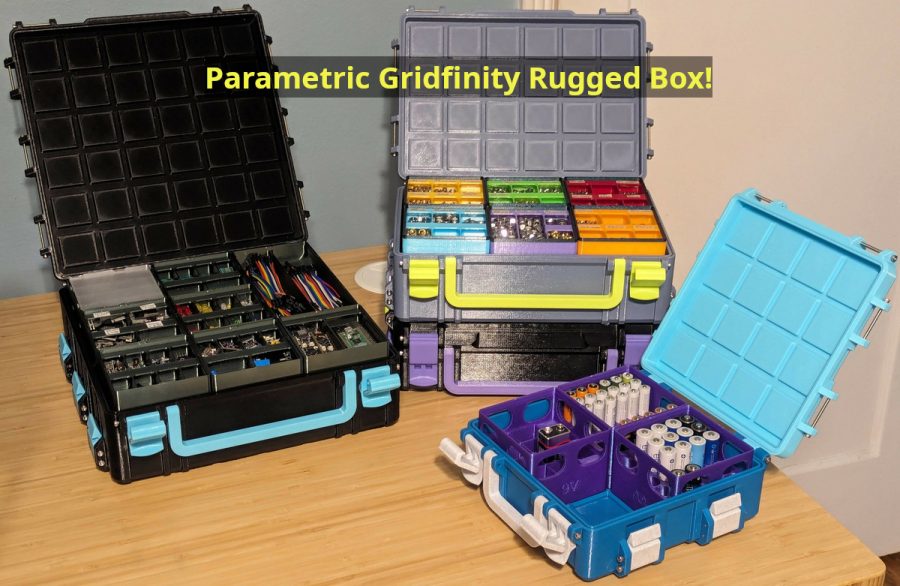
My Rugged Storage Box, now for Gridfinity bins!
Inspired by several other terrific Gridfinity box models, I built a Gridfinity rugged box model of my own! This is a parametric model which can create boxes of any size. I chose OpenSCAD so the software and model would be fully open source.
Features
Gridfinity:
• Configurable sizing in Gridfinity grid units
• Optional exterior stacking grid on top/bottom of box
Box options:
• Choice of latch style (clip or draw)
• Side stacking latches
• Optional handle
• Optional label (new! on February 12, 2024)
• Top opening grip and hinge end stops
• Lip seal, integrated or for 1.75mm filament
• Reinforced (thicker) corners
• Optional third hinge for large boxes
Hardware and Tools
The hinges and latches are attached using M3 screws, M3x40 by default. Depending on whether a handle or stacking latches are desired, a box may take between 6 and 25 screws to assemble.
My boxes are assembled using M3x40 and M3x55 hex socket head cap screws (DIN 912):
• M3x40 (AliExpress 1, AliExpress 2, Amazon, Trimcraft Aviation RC)
• M3x55 (AliExpress, Amazon) -- if attaching the optional handle
To assemble boxes with three stacking latches per side and/or a third hinge, a hex allen key matching your screws is needed since a drill/driver won't fit. M3 hex socket head cap screws use 2.5mm drive, so a ~6" 2.5mm hex allen key is needed for these (Home Depot, Amazon).
Screw length formula
All screws except for boxes with handles:
• Latch Width (default 28mm) + 2 x Rib Width (default 6mm). At default values, 28 + 2 * 6 = 40, or M3x40 screws.
• To use M3x30 screws, set Latch Width to 22 and Rib Width to 4.
For boxes with handles, replace two of the above screws with:
• Latch Width (default 28mm) + 3 x Rib Width (default 6mm) + handle thickness (10mm). At default values, 28 + 3 * 6 + 10 = 56, or about M3x55 screws.
Rendering
OpenSCAD version and configuration
Two OpenSCAD options are available which greatly improve rendering speed, but are currently only in the development snapshots. You can download a development snapshot from the OpenSCAD downloads page (scroll down about half way).
After installation, open Edit > Preferences, and in Features, enable:
• fast-csg
• fast-csg-safer
• manifold
Model setup
The OpenSCAD model depends on included third-party library code. Download and unzip libraries.zip into the same folder as rugged-box-gridfinity.scad and rugged-box-library.scad.
Model rendering
Ensure both rugged-box-gridfinity.scad and rugged-box-library.scad are placed in the same directory. Open rugged-box-gridfinity.scad in OpenSCAD.
Select your desired dimensions and options in the OpenSCAD Customizer. Then, one at a time, select each part (top, bottom, latch, stacking latch, handle) in the Part drop-down. For each part, perform a render (F6) and export to STL (F7).
Recommended model configuration
tl;dr:
• Box parts with different Gridfinity Stackable settings are not compatible. Print all your box parts with this value enabled or disabled, not a mix of both.
• Set Top Height to 2
• Set Bottom Height to 4, 7, or 10 for a 6, 9, or 12 Gridfinity unit tall box, respectively
• To use stacking latches, boxes must have the same Width and a multiple of 2 for Length
• Use draw latches for boxes 9 or more units tall, or clip latches for shorter boxes
Boxes with the Gridfinity Stackable option modify the placement of the internal Gridfinity baseplate and top bases to accomodate the exterior stacking base and baseplate. Therefore both the top and bottom of the box must be printed with the same value for this option; do not mix and match. Additionally, stacking latches will not reach the correct height between the two types of boxes.
I recommend keeping most of the box height in the bottom, so Gridfinity bins will be more contained in the box when the lid is open. I render my box tops with Top Height set to 2 (7mm Gridfinity units).
Most of my Gridfinity bins are multiples of 3 units high (e.g. 3 or 6). I therefore like to print boxes that are multiples of 3 units high. For a total box height at a multiple of 3, I set Bottom Height to the desired box height minus my Top Height of 2. For example, to make a box that is 9 total Gridfinity units tall, I set Top Height to 2 and Bottom Height to 7.
If using the stacking latches feature, boxes will stack if they are the same Width (left to right) and have stacking latch attachments at consistent lengths on the side. To produce boxes with consistent attachment points, set Length (front to back) to a multiple of 2 Gridfinity units. For example, a 6 unit wide and 4 unit long box can use stacking latches with another box of the sam
Similar models
from 350 Kč

from 260 Kč
from 390 Kč