
Printables.com
Customizable Dog Poop Bag Holder
🏭 100+ tiskáren
·
across Czechia
·
⏱ pay after printer accepts
Model author: zacques
·
original on Printables.com
Description
Description
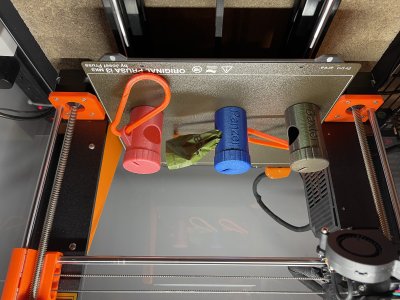
I was out on a walk with my dogs when I noticed the long trail of poop bags streaming behind me. I had lost the top to my poop bag holder!
Instead of overnight ordering another from an online retailer, I thought this was the perfect opportunity to put my design skills to work. After a few iterations, I created a customizable and personalizable poop bag holder.
It's customizable because I am including the Fusion 360 project where I have parameterized the model based on the dimensions of the poop bag rolls. Personally, I use Earth Rated Dog Poop Bags, but I know there are many different types out there which all come in different sizes. Inside the project you can alter the BagSpoolHeight, BagSpoolDiameter, and BagSpoolPinDiameter parameter to create a poop bag holder that will fit any type of bag you use.
It's also personalizable because you can customize the name that goes on the outside! Sadly, you can't parameterized text in Fusion 360, so you will have to alter the sketch named "Dog Name" under the body "Bag Holder Body".
Update V2!
I have printed many of these for friends/family and I have a few small changes in v2. The primary change are different threads and a different top. v1 and v2 are not interchangeable, so please don't try to use a v1 bottom with a v2 top. The other change is that the v2 body does not have any text on it. Since Prusa Slicer 2.6 you can add custom text to your model. It's easier to do this instead of change the model in Fusion. To learn how to add custom text to your model, please follow the guide here https://help.prusa3d.com/article/text-tool_399460.
The settings I use for text are:
• Font: Calibri
• Height: 18mm
• Depth: 0.5mm
• Advanced:
• Use Surface: checked
• Operation: Cut
Parts (v1)
• Bag_Holder_Body.3mf
• Bag_Holder_Top.3mf
• Carabiner.3mf
Parts (v2)
• Bag_Holder_Body_v2_(blank).3mf
• Bag_Holder_Top.3mf
Print Settings and Notes
• 0.2 mm layer height or an even multiple of 0.2 mm
• 3 perimeters
• No brim
• No supports
• The top should be printed upside down with the pin facing up
Similar models
from 150 Kč

Request quote