Printables.com
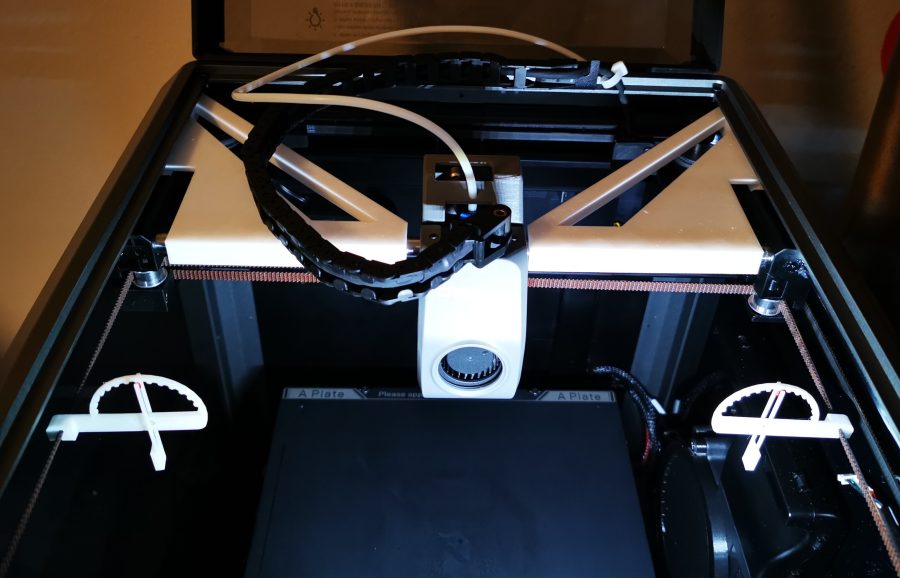
Creality K1 and K1 Max XY axes alignment tool
🏭 100+ tiskáren
·
across Czechia
·
⏱ pay after printer accepts
Model author: RaduSorin1
·
original on Printables.com
Description
Description:
Creality K1 XY axes alignment tool.
Update: Added alignment tools for K1 Max.
It will help keeping the axes perpendicular while adjusting the belts.
Also it will keep the X gantry at 150mm from front pulleys so you can adjust the belts, if you push everything all the way back.
Settings:
Nozzle: 0.4 or as much as you can
Line height: 0.2 or as much as you can
Line width: 0.4 or as much as you can
Supports: No
Brim/Raft: No
Material: Any
Note:
X axis slot has 10mm, Y axis slot has 8mm, also Y is the shortest part (right will fit only right, left only left)
Installation:
• Loosen the belts (as described in the manual, or as you are used to)
• Move X gantry to the front of the printer
• Attach first to Y rod, next to the motors, easier if it's vertically oriented with the tip down.
• After installing both on Y rods, rotate them until parallel.
• Bring X gantry close
• Raise alignment tools a little and slip X gantry underneath
• Lock in place.
• Both should be locked on Y and X rods. Tools and X gantry should be pushed until they touch XY motors bearings supports to achieve the 150mm belt length.
• Proceed to tighten the belts (as described in the manual, or as you are used to)
• Optional you can use the belts tension meter found here https://www.printables.com/model/523382-creality-k1-belt-tension-meter
Similar models
from 150 Kč
from 200 Kč

Request quote