Printables.com
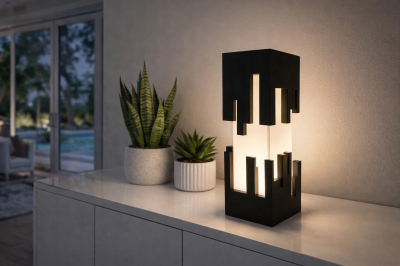
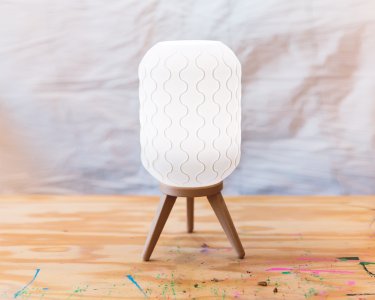
mid-century modern lamp
🏭 100+ tiskáren
·
across Czechia
·
⏱ pay after printer accepts
Model author: Catdad Workshop
·
original on Printables.com
Description
It finally happened! The day every 3D printing enthusiast dreams about. My girlfriend walked into the room on Wednesday evening, showed me a picture of a lamp, and said "can you design and print something like this for me". Little did she know, this week's contest is LED Diffusers, which can more broadly be understood as lamps I guess (I promise, I am using an LED bulb). The problem, however, is that I need to be on a flight midday Friday. And I have work on Thursday. Luckily, who can sleep around <gestures broadly at the world>.
The following is what I designed, printed, assembled, and photographed in basically one day.
Also, as a side note, I think the cat is mad at me. She refused to participate in the photoshoot today. I should consider getting a banana for future scale needs.
Materials
In addition to all the printed parts in this post, you will need a standard HEMMA 40mm light cord. Often, they are listed as "pendant light cord" or "hanging light kit" online. I purchased this specific one, but the dimensions match several other kits I have purchased in the past as well, so I am pretty sure they are all the same. This rope cord looks like it might be pretty cute with the lamp too. You will also need a standard light bulb.
Though optional, you may also want to have a deburring tool, a razor or x-acto knife, and some sandpaper to clean up the prints (cleaning up any elephant's foot will be essential for a good fit for this model).
Printing
You will need to print one of each part: the lamp shade, the insert, the base, and one of each spacer. All parts are designed to be printed on a standard, run-of-the-mill printer, with no modifications required. Here are the settings I recommend for each:
Lamp shade settings
Print this in vase mode. Unless you are going for some sort of visual effect, I suggest printing this in a white filament. My settings were as follows:
• Spiral vase mode / Spiralize outer contour (i.e. vase mode): turn this on, that's what this mode is all about
• Layer height: 0.25mm
• Line width / Extrusion width: 0.7mm (you can set this value even when printing with a 0.4mm nozzle!)
• Bottom layers: 3 (no higher than 0.9mm)
• Wall speed: 40mm/s (you can bump this up a bit if you are confident in your printer)
• Printing temperature: 10 degrees hotter than your usual temperature
Note: Cura 5 users, make sure to unselect "Remove all holes" when slicing this, since we do want the holes in the bottom.
Lamp insert settings
This model also prints in vase mode. I could have made it print in regular mode, but I like vase mode and it's also faster. Plus it looks neat! My settings were as follows:
• Spiral vase mode / Spiralize outer contour (i.e. vase mode): turn this on, that's what this mode is all about
• Layer height: 0.3mm
• Line width / Extrusion width: 0.8mm (you can set this value even when printing with a 0.4mm nozzle!)
• Bottom layers: 0 (leave the bottom completely open!)
• Wall speed: 30mm/s (you can bump this up a bit if you are confident in your printer)
• Printing temperature: 10 degrees hotter than your usual temperature
Lamp base settings
Really, this one can print with any standard profile, nothing special here. However, here were my settings anyway:
• Layer height: 0.3mm
• Line width / Extrusion width: 0.8mm (you can set this value even when printing with a 0.4mm nozzle!)
• Bottom layers: 4
• Top layers: 5
• Infill: 15%, gyroid
• Speed: 50mm/s
• Wall speed: 25mm/s
• Printing temperature: 10 degrees hotter than your usual temperature
Spacer settings
Like the base, the settings here don't matter much. What is important is that the entire piece is solid (which is easy to do, seeing as they are 1mm to 2mm tall). You can just slice them with the same settings as the base.
Cleanup and assembly
1. Deburr the hole in the lamp base where it touched the build plate (the actual top, if you place the base on its feet), the inside of the lamp insert where it touched the build plate, and clean up any potential imperfections on the bottom of the lamp shade. If they all printed perfectly, congratulations! You are very good at levelling your printer.
2. Unscrew the top of the light cord.
3. Place the top of the light cord through the hole in the lamp base, going in from the bottom of the base
4. Place spacer 1 around the cord, between the lamp base and the light socket.
5. Place spacer 2 around the cord right above spacer 1, with the nub on spacer 2 pointing down. The nub should fit inside the cutout on spacer 1, forming more-or-less a flat surface at the bottom of the inserts.
6. Push spacer 1 and spacer 2 together down into the hole of the lamp base, until they are more or less flush with the bottom.
7. Place the lamp insert over the light socket, with the threaded part coming out of the top of the insert. The light socket should catch on the top edge of the lamp insert and you should not be able to pull it all the way through. (Note: I screwed on the top of the cord just for demonstration, don't do that yet.)
8. Push the lamp insert into the lamp base. The first set
Similar models